WebsitesSEO and Website OptimizationIT and Technology19 min czas czytania20 532 znaki3613 słów
Website analytics — what your numbers do when people refuse cookies
What happens to the data when someone clicks reject, why a small site never gets GA4 modelling, and why one consent instead of three costs you data.

Redakcja Digital VantageYour Partner in Business, Digital Vantage Team · Digital Vantage team is a group of experienced professionals combining expertise in web development, software engineering, DevOps, UX/UI design and digital marketing. Together we carry out projects from concept to implementation - websites, e-commerce stores, dedicated applications and digital strategies.
Our team combines years of experience from technology corporations with the flexibility and immediacy of working in a smaller, close-knit structure. We work in agile methodologies, focus on transparent communication and treat each project as if it were our own business.
The strength of the team is the diversity of perspectives - from systems architecture and infrastructure, frontend and design, to SEO and content marketing strategy. As a result, the client receives a cohesive solution where technology, aesthetics and business goals go hand in hand.
Publikacja
Aktualizacja
Companies treat the consent banner as a legal formality: you have to have one, so it gets pasted in and forgotten. An expensive mistake, because the banner is not a legal layer laid over the measurement — it is the layer that decides the measurement.
How it is built and what exactly it switches off determines how many of your visitors appear in the reports at all — and therefore whether any decision taken on those reports means anything.
This is about the architecture of measurement: what happens to the data after somebody clicks reject, what Google will not do to make up for it, and how to set consent up so you are not losing data for no reason. If you want instead how to read the numbers you already have, that is a separate article — on the four ways a report can lie.
Website analytics — four layers where something can break
Before consent, take apart what companies call by one word. Four separate layers, each with its own way of failing — and most conversations about "bad data" are about a different layer from the one the participants have in mind.
Collection. The site sends events: somebody arrived, scrolled, clicked, submitted a form. What breaks here is that the event is not sent at all, or travels under a name nobody is listening for.
Consent. Between collection and everything else sits the visitor's decision. This is the layer the whole article is about, because it decides how much of layer one travels any further.
Processing. Events reach a tool that groups them into sessions, users and conversions. What breaks here is double counting and the inclusion of your own traffic.
Reporting. Only at the end does a number appear that somebody looks at — and it is the only layer you can see, which is why every problem from the previous three looks like a problem with the report.
So: if the numbers look strange, do not start with the report. Start with layer one and work down. The report is almost never where something broke — it is where you can see it.
A tag manager — what it is actually for
The second word that comes up in every conversation about measurement and is rarely explained. A tag manager is an intermediate layer between your site and the tools that are supposed to receive data.
Without it, every tool needs its own snippet pasted into the pages, so adding anything requires a developer and a deployment. With it, the site sends events to one place and that place distributes them by rules set in a panel.
For a company that means three things, the second and third usually left unsaid:
- Changing the measurement stops requiring a deployment. A genuine saving of time and the main reason to use one.
- It creates a place where everything can be broken at once. The rules are powerful and pass through no code review. Access to a tag manager is therefore administrative access, not "access for marketing".
- It is where consent is configured. The declaration of what consent each tag requires lives in this layer — and it is where it is most often missing.
If you do not know who has access to your tag manager, that is the first thing to establish, before any conversation about data.
What happens to the measurement when somebody clicks reject
Consent Mode is a mechanism in which Google's tags are not simply switched off on refusal but change behaviour. With consent, measurement runs with an identifier — it is known that the same person came back three days later. On refusal, a cookieless signal is sent: no identifier, no recognition of a return.
The data does not disappear entirely, but it stops joining up. The same person who arrived from an ad on Monday and sent an enquiry on Thursday is now two unrelated events. The report still shows traffic. It stops showing the path.
For an advertiser this is not an architectural preference. Since March 2024 Google has required Consent Mode v2 signals for remarketing audiences and conversion measurement in its ad products for traffic from the EEA and the United Kingdom — without them those features stop working, whatever the rest of the setup looks like.
Switzerland is not in the EEA, and that distinction is worth holding onto, because it is where most of the confusion around this requirement comes from. A Swiss company selling only to Swiss customers is not caught by it. A Swiss company that runs ads into Germany, France, Austria or Italy is — and so is one whose site simply receives that traffic and remarkets to it. In practice most of the companies we talk to fall into the second group without having decided to: the audience crossed the border before anyone looked at the tagging.
The second, less understood consequence of a refusal is losing the denominator. A conversion rate is a ratio — if the numerator and the denominator are collected under different consent conditions, the result stops being a percentage of anything. Which is why, where refusals exist, there is no sense in comparing "conversion" between months in which the banner changed.
Which rules apply to a Swiss company
This is the point at which a Swiss reader is usually handed either a shrug or a wall of article numbers. Neither helps, so here is the shape of the thing rather than the citations — and for a contract or a policy of any value, a lawyer reads it, not an agency.
There are two regimes in play and they overlap rather than replace one another. If you process the data of customers in the European Union, the GDPR applies to that processing, wherever your company sits — being outside the Union changes nothing about the reach of the rules, only about who is handy to ask. Alongside that, Swiss data protection has its own requirements, built around telling people what happens to their data and leaving them a genuine way to say no.
The practical problem is a timing one, and it is the reason mechanism beats citation here. Your site does not know who it is serving until the page has already loaded. A visitor's location can be guessed from their address, badly and after the fact; a banner that switches its own behaviour on that guess has two failure modes, and both cost you. Guess too strictly and you show a full consent gate to people who did not need one, losing data from your own domestic audience. Guess too loosely and you set an identifier on somebody the stricter regime protects, before anybody asked them.
Which is why, on a site that serves more than one country, the defensible answer is usually the boring one: build to the stricter of the two standards and run one banner for everybody. It costs you some measurement on the domestic side, which is a real cost and worth naming. What it buys is that the answer to "on what basis did you do that?" is the same answer for every visitor, and that the numbers in the report were collected under one rule rather than two — which, as the previous section says, is the difference between a percentage and a number that looks like one.
The same reasoning decides where the data sits, and we come back to that below, because it is a different question from whether you may collect it at all.
The modelling a small business will never get
Here comes the sentence everyone hears when they ask about the hole in the data: "Google will model that." And it is true — under conditions almost no small company website meets.
Behavioural modelling in GA4 has hard entry thresholds: the property must collect at least 1,000 events a day with consent denied for a minimum of 7 days, and have at least 1,000 users a day with consent granted on 7 of the last 28 days. Meeting both guarantees nothing — the model has further criteria, among them the ratio of new to returning users.
To show the scale we use our own site, because it is the only traffic we can actually verify. It runs close to two orders of magnitude below that threshold — and that is an ordinary result for a company website with a blog, not an admission of failure. The units are not even identical, because Google counts users and events while we count sessions, but a gap of that size is not something a correction of units closes. It is not a matter of a good month or a bad one. It is a different scale of website from the one the mechanism was built for.
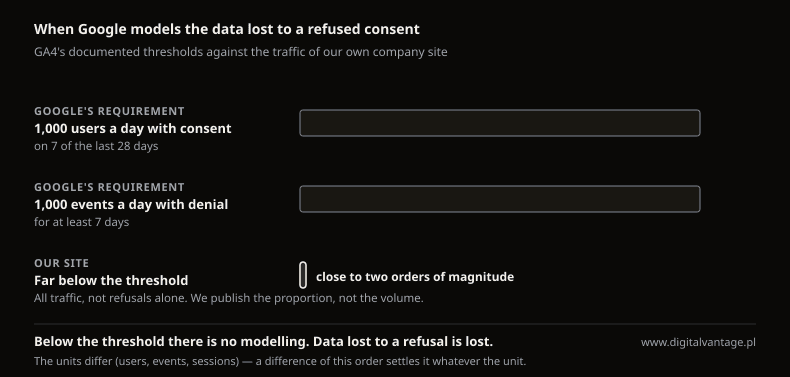
When Google models the data lost to a refused consent
Google Analytics Help and our own analysis
The conclusion worth stating plainly, because tool vendors do not: on a typical company website there will be no modelling. Data you did not collect because of a refused consent is lost permanently. There is no mechanism that reconstructs it later — so the only thing to do is not lose it unnecessarily. The rest of this article is about that.
It is worth being precise about who this does and does not apply to. A Swiss retailer running a shop with daily orders may well clear the thresholds. A regional service company, a practice, a manufacturer with a catalogue site and a few articles a month — will not, and no amount of tagging work changes that. Ask a provider who mentions modelling which of those two your site is, and how they know.
What to do instead when traffic is small
If there will be no modelling, the question tool vendors usually leave unanswered is: what then. There are three routes and each has limits worth knowing.
Count in aggregate, without an identifier. A counter that records how many times a page was opened without tying it to a person or recognising a return. It will not replace analytics — nothing about paths or returning visitors — but it gives you a denominator, a number everything else can be set against. On a small site, often the single most valuable figure available.
Move to an analytics provider whose data location you choose. Two routes. The first is tools installed on your own server rather than used as a service — best known, Matomo; because you pick the server, you can keep the data in Switzerland, which is the cleanest answer when the question is about your own jurisdiction rather than the EU's. The second is a service with a declared data location: Piwik PRO, whose Business plan includes a consent module, precisely the layer this article is about. Checked at the vendor on 9 September 2026: Business from €36/month, up to 2 million actions a month across a maximum of 20 domains with 25 months of retention, thirty-day trial, no card. Above it, Enterprise from €366/month billed annually. There is no free plan. Business data sits in a cloud in Sweden; Enterprise lets you pick the data centre, including Germany and the Netherlands. The prices are the vendor's own and are billed in euro — we quote them as published rather than converting them, because a converted price is a made-up price.
Worth knowing what that does not solve, because it is sometimes sold as if it did. Changing provider does not remove the consent obligation — exactly as with server-side tagging, below. Choosing where the servers stand solves a different problem: which country's rules follow the data once you hold it, not whether you may write an identifier onto a visitor's device in the first place. Those are two separate decisions and they get sold as one.
Count outside analytics. Phone calls, emails, form enquiries, messages from a Google profile. Data you have regardless of consent, because it arises from contact rather than tracking. At a dozen or so contacts a month a hand-kept table is often more accurate than analytics — not a joke: at that scale every contact can be attributed with one question, "how did you hear about us".
These routes do not exclude one another; for a small company the first and third together usually make sense. The second becomes interesting at the point where somebody in the company has to answer a customer's question about where the data is kept — which, in a market where that question gets asked more than most, tends to arrive earlier than the traffic does.
Three consents, not one
The commonest error in the implementations we look at is also the easiest to fix: consent is treated as a single switch. The visitor clicks reject and the whole of analytics goes off along with advertising tracking.
That is a loss with no justification, because people refuse these things to different degrees. Objection to advertising profiling is far more common than objection to plain visit counting — and a single switch welds both decisions into one.
In a correctly built setup, every recipient of data declares what it requires:
recipient | requires | why |
|---|---|---|
Advertising tools | advertising consent | the data goes to an advertising platform |
Analytics | analytics consent | the denominator, without advertising data |
Aggregate counter, no identifier | nothing | there is nothing to attribute to a person |
The rule we apply here: refusing marketing consent must not switch off analytics consent, or the other way round. That is simultaneously a matter of compliance, for the part of your audience the stricter regime covers, and — from the angle companies usually care about more — a matter of whether any denominator survives in the report.
The second half of the rule is the one implementations forget: a separated consent is only real if the banner offers it separately. Three switches in the tag manager behind one "Accept all" button is the same single switch with more configuration behind it.
The banner that inflates its own score
There is one more mechanism that quietly ruins data while looking like a success: the asymmetric banner. The kind where "Accept all" is one click on a highlighted button while refusing requires opening settings and unticking three toggles.
Such a banner raises the formal consent rate. That looks like good news and is often reported as such. In reality some people accepted because it was quicker, not because they wanted to.
Two consequences, both bad for the company. The first is formal: European data protection authorities' guidance points clearly towards symmetry — refusing must be as easy as consenting — a direction to be ahead of rather than behind, and one that reaches any Swiss site with European visitors on it. The second is practical and less obvious: consent forced by button layout inflates your own metric, so you also lose the ability to notice something is wrong. A company with "92% consent" will not ask itself about the quality of its measurement.
An honest banner with a real rate around sixty per cent is a better basis for decisions than a forced one at ninety — because you know what the first one is worth. Your own consent rate, incidentally, is one of the numbers almost nobody can quote about their own site, and it is the multiplier sitting under every other figure in the report.
Server-side does not remove the consent obligation
This is the commonest myth sold with server-side tagging, and it deserves its own paragraph, because it is often presented as the main benefit of the work.
Server-side tagging does give you real things: fuller control over what leaves your site, less dependence on in-browser blocking, better conversion data quality. What it does not give is exemption from consent. The obligation arises from processing a visitor's data, not from which machine that data passes through. Moving a tag from browser to server changes nothing.
Practically: if somebody proposes server-side as a way to "get around the banner", they either do not understand what they are selling, or they do and are counting on you not to. Ask outright on what legal basis the data of people who refused is to be processed. The answer tells you what kind of supplier you are dealing with faster than any reference list.
Auditing what you already have — five things to check
If analytics on your site has been running for years and nobody has looked at it since, start by checking rather than rebuilding. Five things, in order of frequency — all checkable without writing code, though some need a person with tag manager access.
1. Whether the events have a recipient. Surprisingly often a site sends events nobody receives: the name is generated, reaches the tag manager and stops there, because no tag passes it on. The report shows nothing, and it looks like a missing event rather than a missing receiver. Check by comparing the names the site sends against the tags that receive them.
2. Whether the tags declare a required consent. A tag that declares nothing fires after a refusal too. That is the class of error that is simultaneously a formal risk and a reason the data cannot be trusted.
3. Whether conversions are counted twice. If the same event travels two routes — browser and server — with no shared event identifier, both count separately. The report then shows twice as many conversions as happened, and every decision based on cost per acquisition is overstated by half.
4. Whether your own traffic is excluded. Visits from your computers, from the supplier and from monitoring tools stay in the data permanently if nobody filtered them out on the way in. On a small site this is not a rounding error — it is the difference between a report about your customers and a report about your own office.
5. Whether anybody reads the reports. Not a technical question, but it decides the value of the other four. Measurement nobody reads is a cost, not a tool.
An honest note: we find these things at our own end too — our own tagging audit produced a list to fix. That is the normal state of an implementation that has lived a few years and passed through several people, not evidence of incompetence. What matters is that the list exists at all, and that somebody owns it.
What to set up at implementation so you are not fixing it later
Four decisions that cost nothing on a new Google Analytics for a website setup and a great deal to reconstruct afterwards:
- Separated consents from day one. Adding this later means going through every tag and checking each one individually.
- A shared event identifier, if anything is to travel two routes. Without it deduplication will not work, and you will discover that only once you start comparing reports with reality.
- A filter for your own traffic, before the site goes to production. Data already collected cannot be cleaned retrospectively.
- A written list of events — what we send, at which moment and what for. One page of text that in two years saves a week of somebody's life unpicking it. It usually does not exist.
The technical name for that set is a measurement plan, and it sounds more serious than it is: a table with the columns "what", "when" and "why". An implementation without one is possible, but every later question about the data starts with archaeology.
On a multilingual site — which in this market is most of them — add a fifth line to that table: which language version an event came from. It costs one parameter at implementation and is close to unrecoverable later, and without it the question "does the French version convert worse, or simply get less traffic?" has no answer in the data at all.
What this means for a small business
Five things, cheapest first:
Separate the consents. Analytics apart from advertising. That is a setting, not a project, and it recovers the denominator from the people who do not want ads but have nothing against visits being counted.
Make refusing as easy as consenting. One button next to the other, on the first screen. You will end up with a lower consent rate, and that is good news, because from that moment the number means something.
Find out what your consent rate actually is. One of those figures almost nobody knows about their own site, and without it every report is read wrongly, because you do not know by how much it understates.
Decide once whether you build to one standard or two. If any meaningful part of your audience sits in the European Union, one banner built to the stricter rule is simpler to run and simpler to defend than a setup that tries to tell your visitors apart before the page has loaded.
Do not plan on modelling. At your scale there will be none. Everything that is to be measured has to be measured for real — or counted another way, outside analytics: the phone calls, emails and form enquiries you have anyway. Though it is worth first checking that those enquiries arrive at all, because a silent form failure looks exactly like a lack of interest in the report — how to test that.
And one last thing, beyond the tools: some contacts will never appear in any report, because they come from a referral or a conversation. Measurement is there to narrow the area of guesswork, not to pretend there is none. Where contacts actually come from, we broke down using our own data.
We will find out how much your measurement actually sees
How consent is set up, what a refusal switches off, what your real rate is and which data you are losing for no reason. Fifteen minutes and a list of fixes, most of them settings rather than deployments.
Related Posts
- Website builder, CMS or analytics — six situations and one text for each
Six situations: choosing a system, a website builder you run yourself, WordPress editors, testing a finished site and measuring it. Start with yours.
- 1.WordPress themes — how to choose one you will not be replacing in a year
WordPress themes are not chosen on looks. Three fields in the directory tell you what a theme will cost you in a year — and what disappears when you switch.
- 2.Web page builders - The complete guide
Practical step-by-step guide: preparing materials, SEO setup, avoiding mobile and reload errors. When to order a migration.
- 3.Page builder for businesses - decision frame, ROI and costs
How do page builders affect Core Web Vitals, SEO and indexing? Practical steps: CDN, lazy-loading, design tokens and criteria for deriving components into code.
- 4.Website testing — how to check a site so the result means something
Why a single measurement proves nothing, how a lab score differs from field data, and what to check before a site goes live and before you sign it off.
- 5.CMS without code - how to build a site and scale without programming
Practical guide for entrepreneurs: how to implement CMS without code in 4-6 weeks, comparison of technical criteria, migration, conversion optimization. Check.
- 6.Complete WordPress Setup Guide - how to create a professional company website step-by-step
Learn more about Wordpress Setup. A practical guide with concrete tips and examples. Learn best practices and avoid common mistakes.
- 1.
About the Team
Digital Vantage Team
Your Partner in Business, Digital Vantage Team
Digital Vantage team is a group of experienced professionals combining expertise in web development, software engineering, DevOps, UX/UI design and digital marketing. Together we carry out projects from concept to implementation - websites, e-commerce stores, dedicated applications and digital strategies. Our team combines years of experience from technology corporations with the flexibility and immediacy of working in a smaller, close-knit structure. We work in agile methodologies, focus on transparent communication and treat each project as if it were our own business. The strength of the team is the diversity of perspectives - from systems architecture and infrastructure, frontend and design, to SEO and content marketing strategy. As a result, the client receives a cohesive solution where technology, aesthetics and business goals go hand in hand.